How to access iPhone files with a disk mount

It was easy to mount the original iPod and access it liks a USB drive. It's possible to do that with an iPhone, too, although there are different approaches depending on the type of data you want to work with.
In this article we'll explore the following different approaches:
| Technique | Files available | Requirements |
|---|---|---|
| PTP | Photos & videos | Built-in to Windows & macOS |
| AFC | Photos, videos, & some apps | iTunes |
| FUSE (no jailbreak) | Photos, videos, & some apps | Free FUSE client |
| FUSE (with jailbreak) | All files | Jailbreak, free FUSE client |
| WebDAV via Filza | All files | Jailbreak, free WebDav client |
| AFC2 | All files | Jailbreak, AFC2 plugin, AFC2 client |
| Other | None | Not working on modern iOS |
PTP: Accessing Photos, videos and camera data as a disk mount
iOS automatically presents modern devices as cameras when they're connected over USB. This uses Picture Transfer Protocol (PTP) which is a fairly limited system allowing you to copy photos back and forth. You'll probably recognise the DCIM folders that photos tend to appear in.
PTP has a number of drawbacks: most obviously, you can't access files other than from the camera. And PTP doesn't support functionality such as renaming or modifying files or folders: instead, it must delete and recreate them to effect a change. This is slow.
Accessing photos & app data over AFC with iTunes
Apple's knowledge-base has an article describing how to manage rudimentary filesharing with iTunes.
Accessing app data over USB with FUSE
FUSE is a system that lets users mount drives on their Windows or Mac computers without needing to make administrator-level changes to their systems. FUSE stands for "filesystem in userspace" and is available in different forms on most platforms. FUSE itself is an abstraction layer, in that it isn't the technology that communicates directly with the device or data source: usually, another approach is used for that. In the case of mounting an iPhone as a drive, FUSE would communicate with the iPhone using another protocol: SSH, AFC/AFC2, PTP or WebDAV. On Windows, the popular Dokan user-mode file system is often used, and on macOS osxfuse is popular.
From a user's perspective, because FUSE normalises the way the device's data is presented, it usually doesn't matter which underlying protocol is responsible for the mount.
Using a FUSE mount on macOS
Let's demonstrate that approach on macOS, and how to mount a device. In order for this to work, you'll need to install the free Homebrew Package Manager and be familiar with using Terminal on macOS.
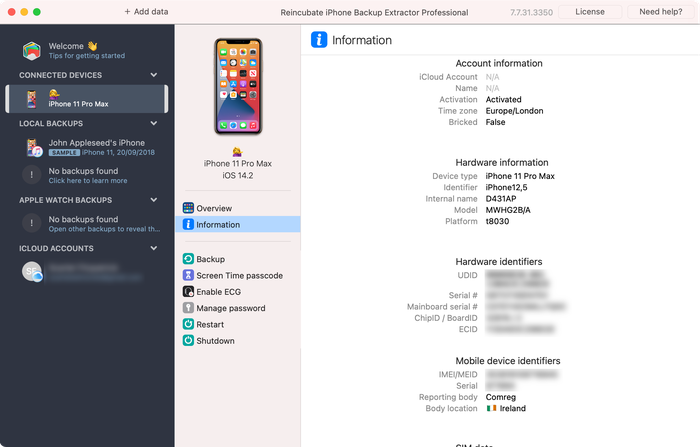
First of all, let's find your device's UDID. You can do this with the free version of iPhone Backup Extractor, with the lsusb command, or with ioreg -p IOUSB -l -w 0. Run iPhone Backup Extractor while your device is connected, select your device, and choose the "Info" tab. You'll see the UDID shown in the "Hardware identifiers" section:
Next, let's get FUSE for macOS ready:
$ brew tap homebrew/cask
$ brew cask install osxfuse

==> Caveats
To install and/or use osxfuse you may need to enable their kernel extension in

  System Preferences → Security & Privacy → General

For more information refer to vendor documentation or the Apple Technical Note:

  https://developer.apple.com/library/content/technotes/tn2459/_index.html

You must reboot for the installation of osxfuse to take effect.
And let's install ifuse, which is the code that can communicate with iOS devices through FUSE:
$ brew install ifuse
With ifuse installed, it's possible to mount your iPhone or iPad using the UDID we obtained earlier:
$ mkdir ~/iphone
$ ifuse ~/iphone --udid 000000000000000000000000
That'll mount your iPhone as a disk on your machine. If you'd like to go further and dig into more data, this superuser post is rather handy, and similarly, this post covers use of the usbmuxd tool.
Need to use a pre-release version of usbmuxd?
usbmuxd isn't frequently updated, so occasionally when a new version of iOS is released, it lacks support. To fix that, you can install the latest development version of it as below:
brew unlink usbmuxd
brew install --HEAD usbmuxd
brew unlink libimobiledevice
brew install --HEAD libimobiledevice
brew cask uninstall osxfuse
brew cask install osxfuse idevicepair
Accessing app data over USB with FUSE on a jailbroken device
The instructions are exactly the same as above. With the device jailbroken, you'll see more data straight away. Neat, eh?
Using Filza's WebDAV server for iOS root file access
On a jailbroken iOS device, it's possible to install a file manager app named Filza through Cydia. Under Fileza's settings, you can enable WebDAV server mode. This provides a fairly simple interface for other devices to access your iOS device, although it is extremely insecure. WebDAV is a very general mechanism for working with web data, and there are many clients which can access it: including a web interface that's built-in to Filza. Connect to your device with a web browser, and you'll see the interface. Easy.
Using AFC2 to access iOS files over USB
AFC2 can be installed from Cydia, and once installed will allow an AFC client to browse the device in its entirety.
Other techniques for accessing all data on jailbroken devices
Prior to the release of iOS 8, there were several Cydia plugins for jailbroken devices which would make an iPhone present itself as a USB stick when connected. Alas, these are no longer supported on modern versions of iOS.
Recovering deleted files from a mounted iOS device
If you can mount your iPhone or iPad as a drive, you might think you could recover deleted files by manipulating the filesystem directly on a jailbroken device. Unfortunately, you can't recover files this way from an iPhone as the filesystem is encrypted. Even if you could find bits of the data, you wouldn't be able to decrypt them. Each file has its own encryption key, and those keys are discarded on deletion.
Apple's iOS Security Guide covers this briefly on page 17 in the "architecture overview":
Every time a file on the data partition is created, Data Protection creates a new 256-bit key (the “per-file” key) and gives it to the hardware AES engine, which uses the key to encrypt the file as it is written to flash memory using AES-XTS mode. On devices with an A7, S2, or S3 SoC, AES-CBC is used. The initialization vector is calculated with the block offset into the file, encrypted with the SHA-1 hash of the per-file key.
Mounting can work well for getting to extant files, but it's not much help for recovery. For that, you either need an iTunes or iCloud backup, data synced with the iCloud, or a forensic image of the device from before the data was deleted.
Bonus: mounting your Windows computer from your iPhone or iPad
iOS 13 saw the introduction of SMB support to iOS. This allows users to remotely access drives on Windows computers. This is how it works:
-
Find the IP address of your Windows computer. The
ipconfigcommand should tell you this. -
On the Windows computer, right-click the folder you'd like to share and choose
Properties→Sharing→Advanced sharing. Click "Share this folder". -
In the Sharing tab, select
Share..., then in the drop-down menu select your user account, add it, and make sure it has "Read / write" permissions. Click "Share" and "Apply", and close the window. -
On your iOS device, open Apple's "Files" app, tap "Connect to a server". Type
smb://followed by the IP address of your PC. Then choose "Registered user" and enter your Windows account name and password.
With this done, your Windows drive should appear on the iOS device.